
WabiSabi Coordinator for Wasabi Wallet
Combine your bitcoin transaction with others into one batch — lower fees, better privacy. Free and not-for-profit.
🕶️ Privacy can be a side-effect of batching your transactions 🕶️
Combine your bitcoin transaction with others into one batch — lower fees, better privacy. Free and not-for-profit.
🕶️ Privacy can be a side-effect of batching your transactions 🕶️
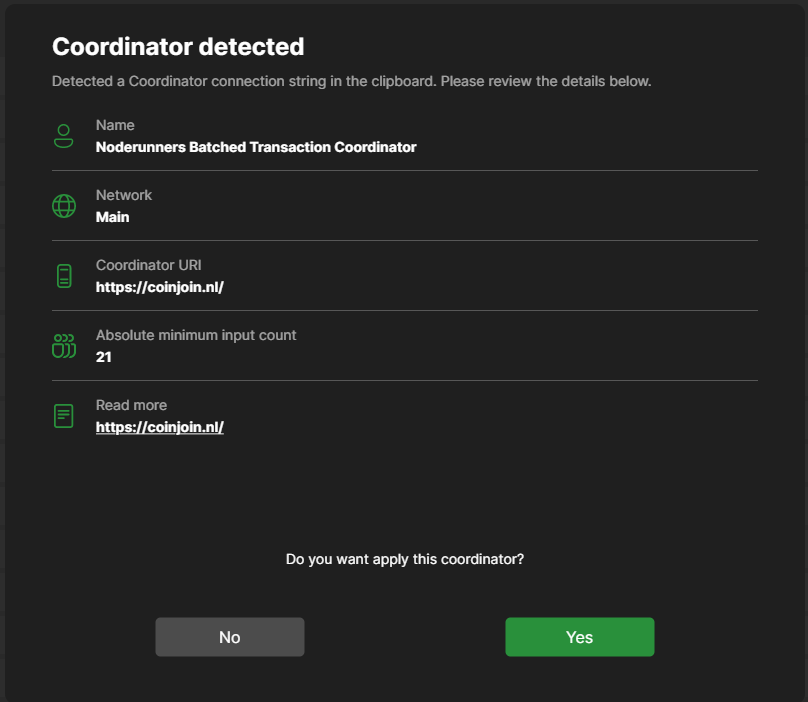
Open your wallet, receive the funds you'd like to CoinJoin and press the play button to start!
Watch the 3-minute explainer.
Short answers — each links to the relevant chapter of the Wasabi documentation for depth.
No. Your keys never leave your wallet — the coordinator only collects signed inputs and outputs into one transaction. Wasabi refuses to sign unless your exact coins come back to addresses you control, so the worst a malicious coordinator can do is fail the round. More: FAQ — Use Wasabi
coinjoin.nl charges a 0% coordinator fee. You pay only the bitcoin mining fee for your share of the transaction — and because a coinjoin batches many payments into one transaction, that share is often lower than a solo transaction.
As little as the WabiSabi protocol allows: registrations arrive separately over Tor and are blinded with cryptographic credentials, so the coordinator cannot link your inputs to your outputs — that unlinkability is the whole design. More: FAQ — Bitcoin privacy
Wasabi skips coins that are too small to be economical to coinjoin (dust), and our weekly round starts once enough inputs register — 26+ for the Sunday round. Practically: anything above dust size can join. More: CoinJoin in depth
Yes — your wallet must be online during the round to register, sign, and confirm. If you disconnect, the round simply continues without you; your coins never move without your wallet's signature. More: CoinJoin in depth
Nothing is at risk: a failed round produces no transaction at all, and Wasabi automatically joins the next one. Rounds fail when participants drop out — it costs you nothing but time.
A coinjoin is an ordinary bitcoin transaction that several people sign together — batching payments for lower fees is its own justification, and privacy can be a side-effect. Rules differ per jurisdiction and exchange; this is not legal advice. More: FAQ — Introduction
Wasabi Wallet on desktop — see Get started. Hardware wallet signing (keys never on the computer) is under development — see the Hardware wallet tab. More: FAQ — Installation
User error (registration over clearnet without Tor) or malicious coordinators can lead to loss of UTXO privacy. Always update to the latest Wasabi Wallet version when possible and do your own research — start here:
Literature: WabiSabi: centrally coordinated coinjoins with variable amounts (protocol paper) · ZeroLink: the Bitcoin fungibility framework (Wasabi 1.0 basis) · The unique dressing of transactions: Wasabi coinjoin detection · Adoption and actual privacy of decentralized coinjoin implementations · Usability of cryptocurrency wallets providing coinjoin transactions
Critiques & attacks: Kogman: How coinjoin anonymity can be undermined using clustering · Kogman: Bitcoin without privacy is a surveillance system · Yuval Kogman (nothingmuch) on centralized coinjoin deanonymization · Analysis of input–output mappings in arbitrary-value coinjoins (paper)
Sybil resistance & JoinMarket research: Sybil resistance in different coinjoin implementations (bitcoindev, with waxwing & nothingmuch) · Fidelity bonds design (Chris Belcher) · waxwing's (Adam Gibson) blog
Comparisons & counterpoints: Peter Todd's coinjoin comparison · Kruw presentation BTC++ Riga 2025
Scroll through the inputs and outputs of the latest real round — experience for yourself how UTXO linking analysis works and how a coinjoin frustrates it.
The most recent successful coinjoin, straight from the coordinator.
Bonus: coinjoin with the keys on a hardware wallet — built for larger-value coins. Your keys never touch the computer: even a compromised PC can't steal them, and the device itself enforces the coinjoin policy (your coins can only go back to your own wallet, within a capped fee). Unlock, approve once on the device, and rounds sign unattended. Under development.
Wasabi Preview releases (download the latest) · pytrezord (lightweight Trezor bridge) · feature/trezor-coinjoin (Wasabi branch, under development)